Start here · about 90 minutes
Congratulations, friend. You're in.
Here's what you'll have in about 90 minutes:
- Two free reports with your name on them. The $35 Machine and The $128 Decision, the offers that pull in the people most likely to be curious about HBA.
- A seven-page funnel branded to YOU. Your name, your email and your affiliate links on every page.
- Your own email list, and nine follow-up emails that go out on their own over 14 days.
- A bonus stack for everyone who joins through you, with your name on it.
- This same start page and funnel for your team. Everyone who joins through you gets their own copy.
- A green ✓ Setup verified that proves it all works, and tells the person who brought you in.
90 minutes. That's it.
Then you'll have the $35 Machine plugged in, turned on, and ready to turn traffic into leads, and leads into sales.
From there... you start feeding the machine.
Here's why it's built this way.
In August 2026, Rob Fore had a file built on 32 people who each earn $100,000 or more a year. 14 in network marketing. 18 in affiliate marketing. He wanted to know HOW they keep pulling in traffic, leads and sales, year after year.
That income is far from typical. HBA's own disclosure puts the median active affiliate at $0 for the 12 months to 31 July 2026.
Here's what he found. WHAT they promoted was never what made it work.
HOW they promoted it did. The tools, the steps, the rhythm. The steps below are those steps, in order, with a screenshot for every click.
And it doesn't stop with you.
When someone joins HBA through your link, you open one page, fill in their affiliate ID, copy the email it writes for you, and send it. About five minutes. The First buyer page walks you through it.
That email gives them this same start page and this same machine, with their own name on it. When they sign someone up, that person gets it too. Nobody who joins through you starts from a blank page.
HBA pays one tier. You earn on the people you refer yourself, not on the people they bring in.
It won't happen overnight. Nothing here promises money.
What the machine does is keep working through the quiet stretch at the start. That's where most people quit.
A video you post this week can still bring someone to your page months from now.
It's built for someone with an hour or so a day and about $100 to spare over three months. You don't need a website, an audience, ads or a big budget. Every link on this page already has your affiliate ID in it.
Three things, in this order
| What you do | Time | You finish with | |
|---|---|---|---|
| 1 | Set up HBA (Part 1) | about 20 min | Your affiliate links switched on and your two dates on the calendar |
| 2 | Build your funnel (Parts 2 to 5) | about an hour | Your own list, form, pages and nine follow-up emails |
| 3 | Test it (Part 6) | about 10 min | ✓ Setup verified, and your sponsor is told |
That's everything. Nothing else in HBA needs your attention until you see ✓ Setup verified. Tick Done at the end of each step: the bar at the top of this page remembers where you got to (in this browser) and takes you straight back.
Before you start
- A desktop or laptop with Chrome. A phone works for reading this, not for building.
- Your HBA login. You'll use the HBA Emailer (it comes with any Let's Goal, Funnel Builder or Premium subscription) and Funnel Builder (for the branded pages). The $35 Starter Pack covers both.
1 of 3 · Set up HBA
Part 1: Do HBA's own setup first
Part 1 of 6 · about 20 minutes · you finish with your affiliate links unlocked
HBA has its own short checklist. Do it first. It's quick, and your affiliate links stay locked until you finish it.
Step 1: Work through HBA's setup checklist (about 4 minutes)
- Open thehba.app/setup. You'll see a short video from Mike and a checklist.
- Tick off each line: Setup Your Logins (App & Funnel Builder), Upload Image Avatar, Add app to your phone, Turn on push notifications, Introduce yourself to the community!
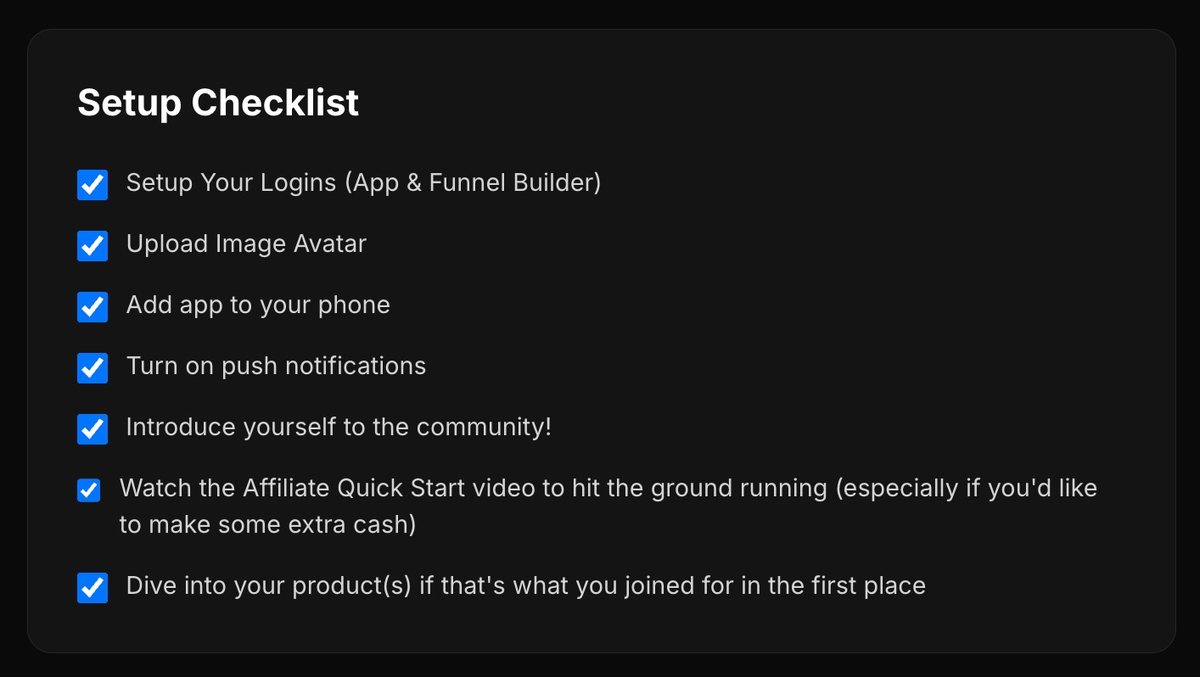
That's it. You're set up inside HBA.
Step 2: Get your affiliate links (about 10 minutes)
HBA gives you affiliate links only after four things are true. You're 18 or over. You own at least one core product. You've agreed to the affiliate agreement. You've finished the HBA Affiliate Compliance Training.
- Open thehba.app/affiliate.
- If it asks for the compliance training, do it now. It covers the rules you'll follow on every post and email.
- Accept the agreement.
"REQUIRED LEGAL DISCLAIMER: Typical affiliates earn no income. This is not a get-rich-quick program. No sales = no income. Full earnings disclosure: thehba.app/income"
Done when: the Affiliate area shows My Links with links in it.
While you're there, check one number. In any of those links, your ID is the part after aff_id=. It should match the ID shown at the top of this page. Every link on this page uses that number.
Different? Stop here and reply to the email from the person who sent you this page. Paste this in, with your real ID in the gap:
Hi, quick one before I go further. My HBA affiliate ID in My Links is ______, but my onboarding pages show YOUR-ID. Could you send me my start-here link again with the right ID? Thanks
Step 3: Protect your subscription (about 3 minutes)
- Open your HBA Profile, then Manage subscription.
- Check the card on file won't expire in the next 12 months.
- Add a backup card.
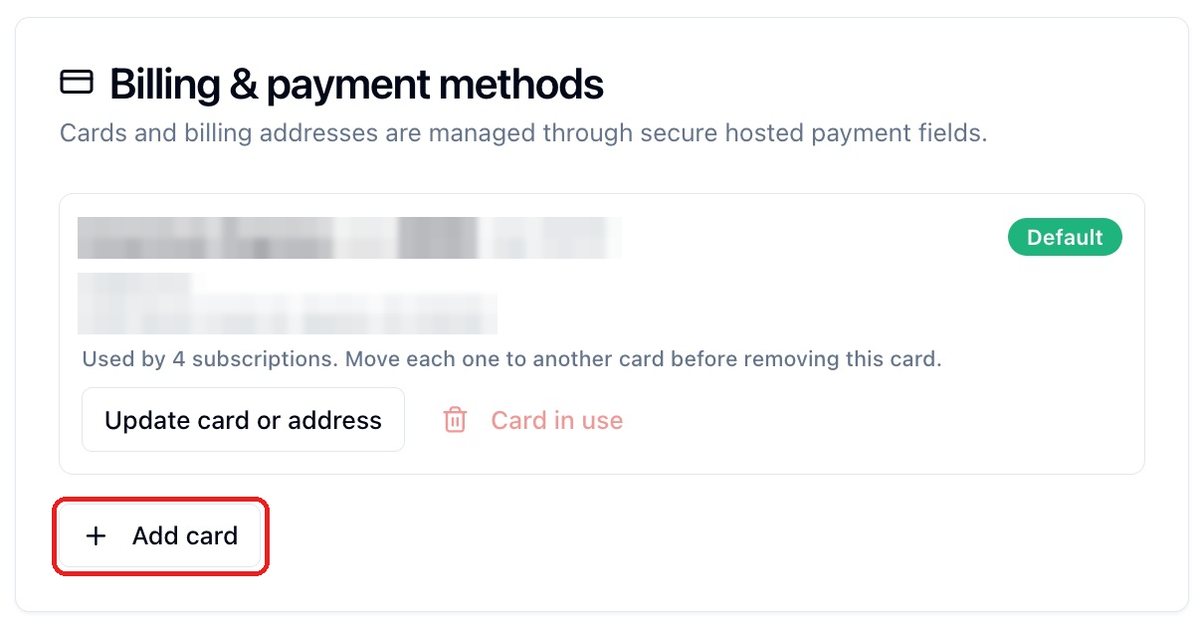
Here's why. If a payment fails and isn't fixed, your customers can be moved to someone else after 60 days inactive. A backup card is five minutes of insurance.
Step 4: Put two dates on your calendar (about 2 minutes)
Two clocks started the day you joined. Count that day as day 1, which gives you the earlier, safer date. Write both down now.
| Clock | Put this on your calendar | What you decide |
|---|---|---|
| Premium trial (if you joined on the $35 pack) | Day 12 after you joined | Keep Premium at $125 a month, or cancel it and stay at $35. On day 15 the pack becomes $160 a month unless you cancel. Trials can't be refunded. |
| Financial Literacy Academy half price | Day 10 after you joined | Buy FLA at $500, or let the window close on purpose. After day 10 it's $1,000. Don't borrow it. |
Both are earning decisions as well as product ones. HBA pays you only on products you own, so a customer who buys Premium or FLA through you pays you nothing on it unless you own it too. In Rob Fore's six-year ledger those two were 80.1% of every commission dollar. His results, not typical.
That's Part 1. HBA is set up, your links are unlocked, and you won't be surprised by a charge.
2 of 3 · Build your funnel
Part 2: Make your list and your form
Part 2 of 6 · about 10 minutes · you finish with a form number, like 1187
A list is where your sign-ups are stored. A form is the box on your page where they type their name and email. You'll make both in one go, because making the list from inside the form is what joins them.
Step 1: Open Forms and Webhooks
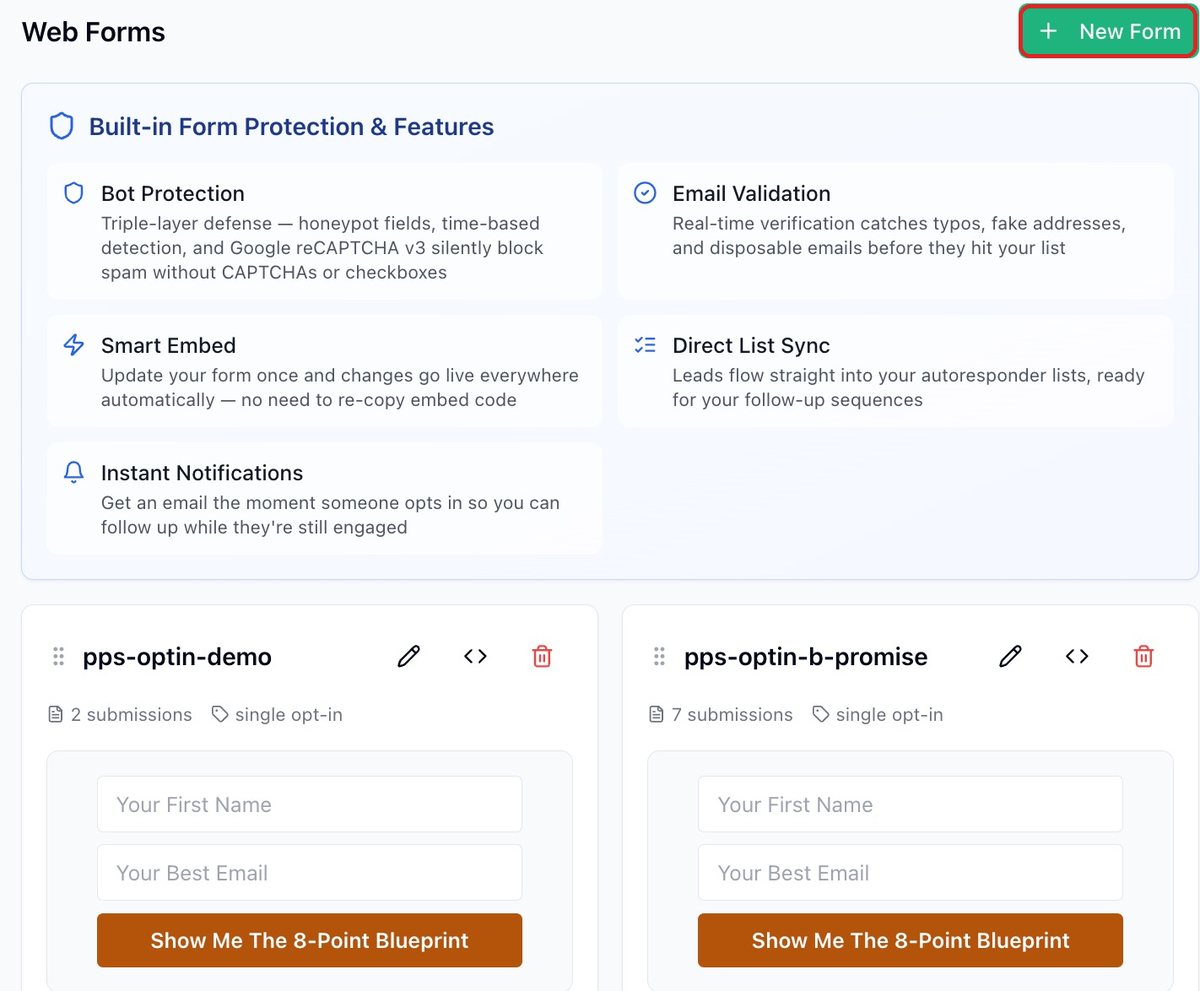
- Open thehba.app/emailer.
- Click Forms and Webhooks.
- Click + New Form. A form editor opens.
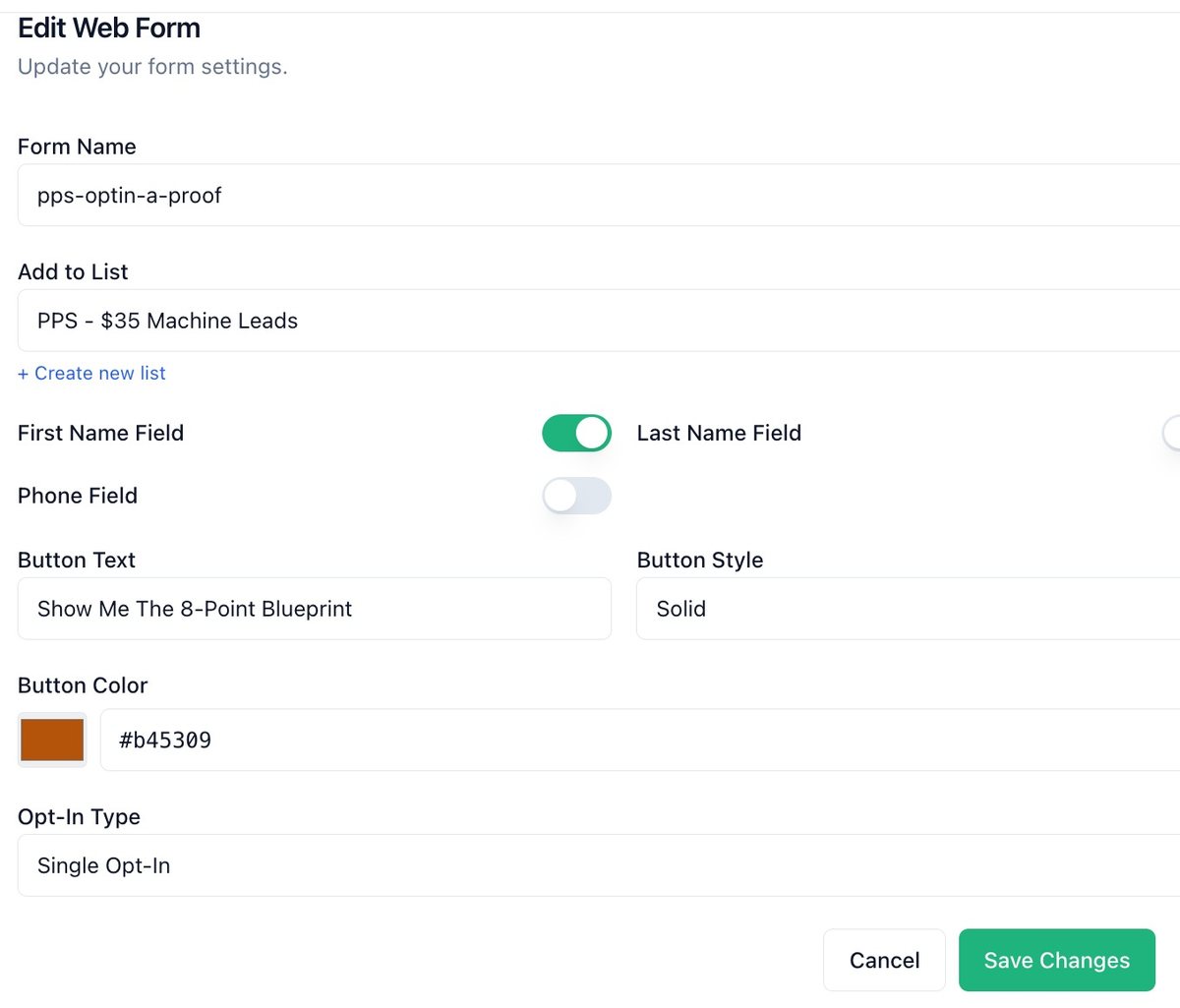
- In Form Name, type exactly:
pps-optin
Step 2: Create the list from inside the form
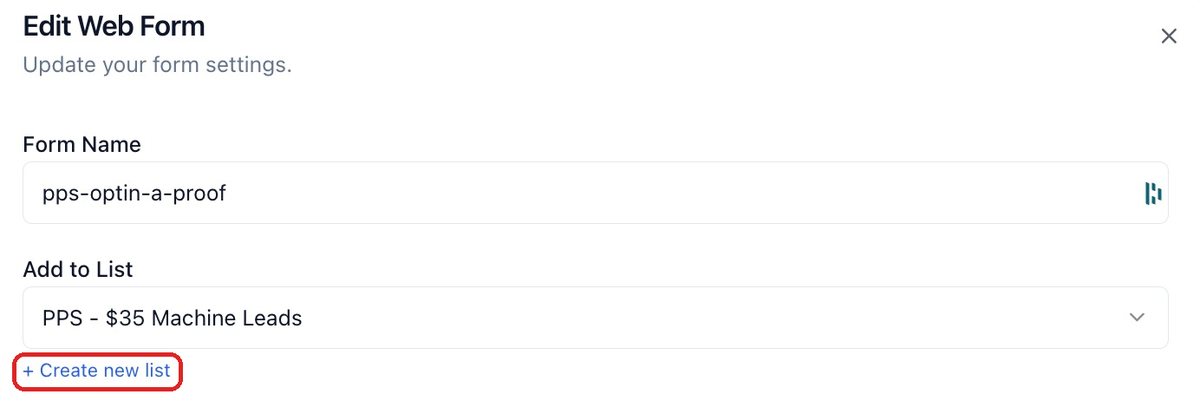
- Under Add to List, click + Create new list.
- Name the list exactly:
PPS - $35 Machine Leads - Click the green Create button. Naming the list is not enough: until you click Create, the list does not exist.
Note: The screenshots show Rob's own form, named pps-optin-a-proof. Name yours pps-optin.
Step 3: Fill in the form settings
| Setting | Set it to | Why |
|---|---|---|
| Form name | pps-optin (you typed it in Step 1) | Every later step calls it this |
| Fields | First name, Email. Nothing else | Every extra box costs you sign-ups |
| Opt-in type | Single | People land on your page straight away |
| Button text | Show Me The 8-Point Blueprint | The label lives on the form, not the page |
| Button color | #b45309 | Matches your pages |
| Notify me of new leads | Your choice | On means an email for every sign-up |
| Thank You Redirect | Leave it for now | You'll get your own address in Part 3, and set it in Part 4 |
Step 4: Save and copy the form number
- Click Create form.
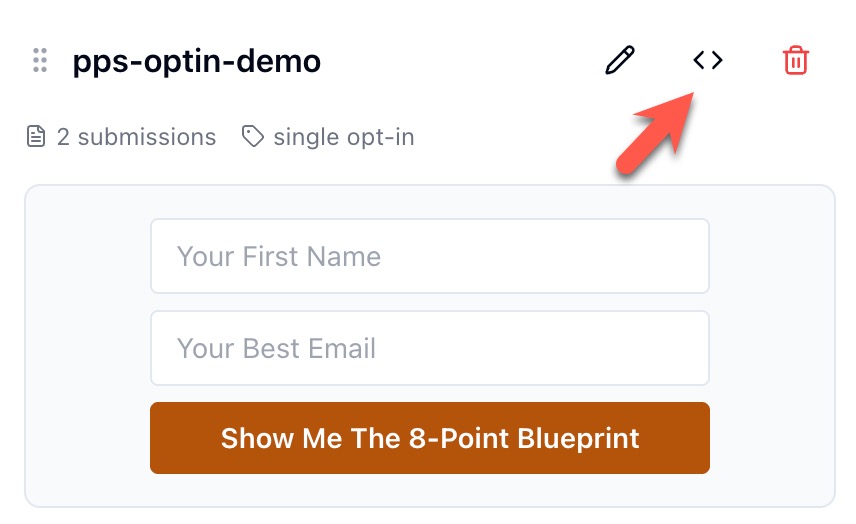
- Your form appears as a card. Click the <> icon at its top right, between the pencil and the bin.
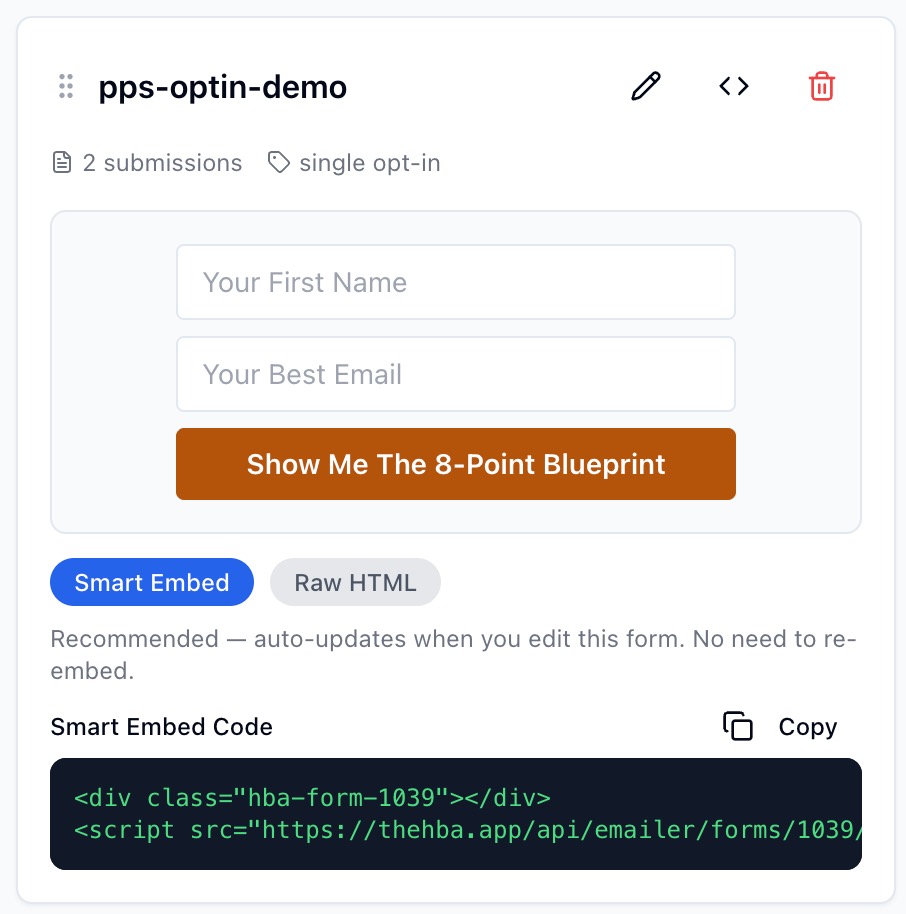
- Under Smart Embed Code, find
hba-form-followed by a number. That number is your form number. In this example it's 1039. - Write it down: Form number: ________. Part 3 asks for it.
That's it. You have a list, a form that feeds it, and your form number. Next you put your name on your pages.
Part 3: Brand your funnel to you
Part 3 of 6 · about 5 minutes · you finish with an email that says "Your pages are live"
Now you tell us your details, and your pages are built with your name on them.
- Click this button. The form opens in a new tab.
Open my branding form →Open my branding form → - The form's first page repeats Part 2, which you've just done. Scroll to the bottom and click the button there to go on to the next page. Your pages aren't built yet.
- Fill in your name, the email address you want printed on your pages, and your form number from Part 2. Your affiliate ID is already filled in. Click the button at the bottom.
- Enter the day you first joined HBA, even if it was years ago. Click the button at the bottom to send the form. This is the one that builds your pages.
- Check your email. It goes to the address you typed for your pages. Within a minute or two you'll get "Your pages are live, [your first name]" from Simple Proven Profits. Not there? Check spam.
- Click the link in that email. It brings you back to this page at Part 4, with your details filled in. Bookmark it there: Parts 4 to 6 use it.
That's it. Your pages exist. Next, you point your form at them.
Part 4: Point your form at your own confirmation page
Part 4 of 6 · about 3 minutes · you finish with sign-ups landing on YOUR page
When someone signs up, the Emailer sends them to a page. Right now it sends them to a default. You'll send them to your own confirmation page, the one with your name and your links on it.
Your confirmation link is here, built from your details. Copy it:
https://simpleprovensystems.com/pps-confirmed?…
It isn't showing yet because this page doesn't have your details. Open this page from the link in your "Your pages are live" email (end of Part 3), and it appears here.
Didn't get that email? It went to the email address you typed for your pages, so check that inbox and its spam folder. Still nothing? Contact your sponsor. Don't type this link yourself. A short one like pps-confirmed?m= plus your ID puts no name on your page, and opening it tells your sponsor you're live before your funnel works.
- Click Copy on your confirmation link above. Copy it from this page, never from an email: email can change links.
- In the Emailer, open Forms and Webhooks. Under Web Forms, find your
pps-optinform card and click the pencil at its top right. An Edit Web Form window opens. - Scroll down inside that window, past Opt-In Type and Email Notifications. Thank You Redirect is the last section, just above Save Changes.
- Click Custom URL. A box appears. Paste your confirmation link into it. It starts
https://simpleprovensystems.com/pps-confirmed?m=and ends with your details. - Click Save Changes.
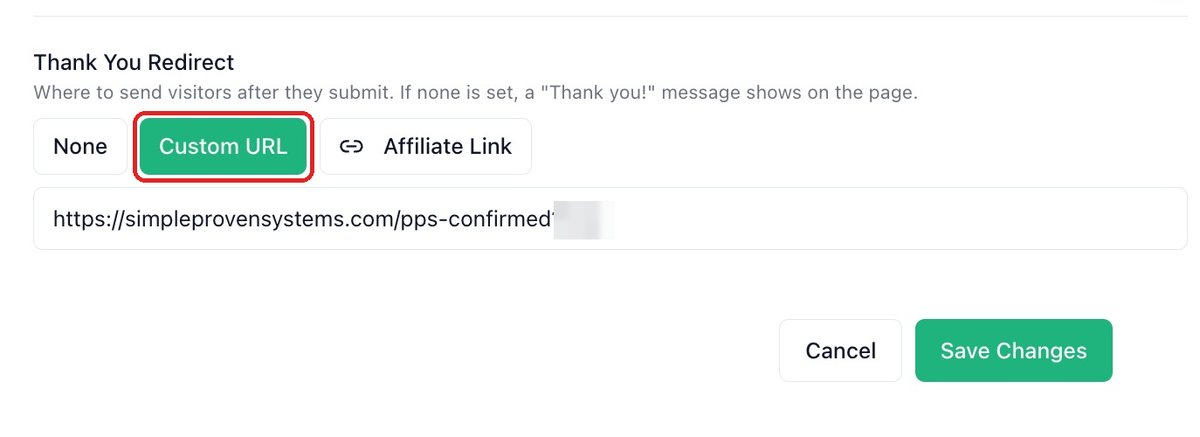
? is what puts your name on the page. A link that ends at pps-confirmed sends your sign-ups to a page with no name on it.That's it. Every sign-up now lands on your page. You'll prove it in Part 6.
Part 5: Load the nine follow-up emails
Part 5 of 6 · about 40 minutes · you finish with nine saved emails, switched off
Your nine emails are already written, with your name and your links inside them. They're on their own page, with a copy button for everything and the instructions beside them.
- Open your emails page. It opens in a new tab.
Open my nine emails →Open this page from the link in your "Your pages are live" email, and this button appears here. No email? See Part 4. - Do its Step 1 (make the sequence) and Step 2 (add the nine emails). Leave the sequence switched off.
- Stop when you reach its Step 3 and come back here. Part 6 is that test, step by step.
Nine down. The sequence is ready, and still off. Next you switch it on and prove the whole thing works.
3 of 3 · Test it
Part 6: Switch it on and test it
Part 6 of 6 · about 10 minutes · you finish with ✓ Setup verified
Everything so far looks right whether it works or not. This test is the only way to know. It's also what tells your sponsor you're live.
Step 1: Turn on Perfect Timing, then the sequence
- In the Emailer, open Autoresponder, then your sequence
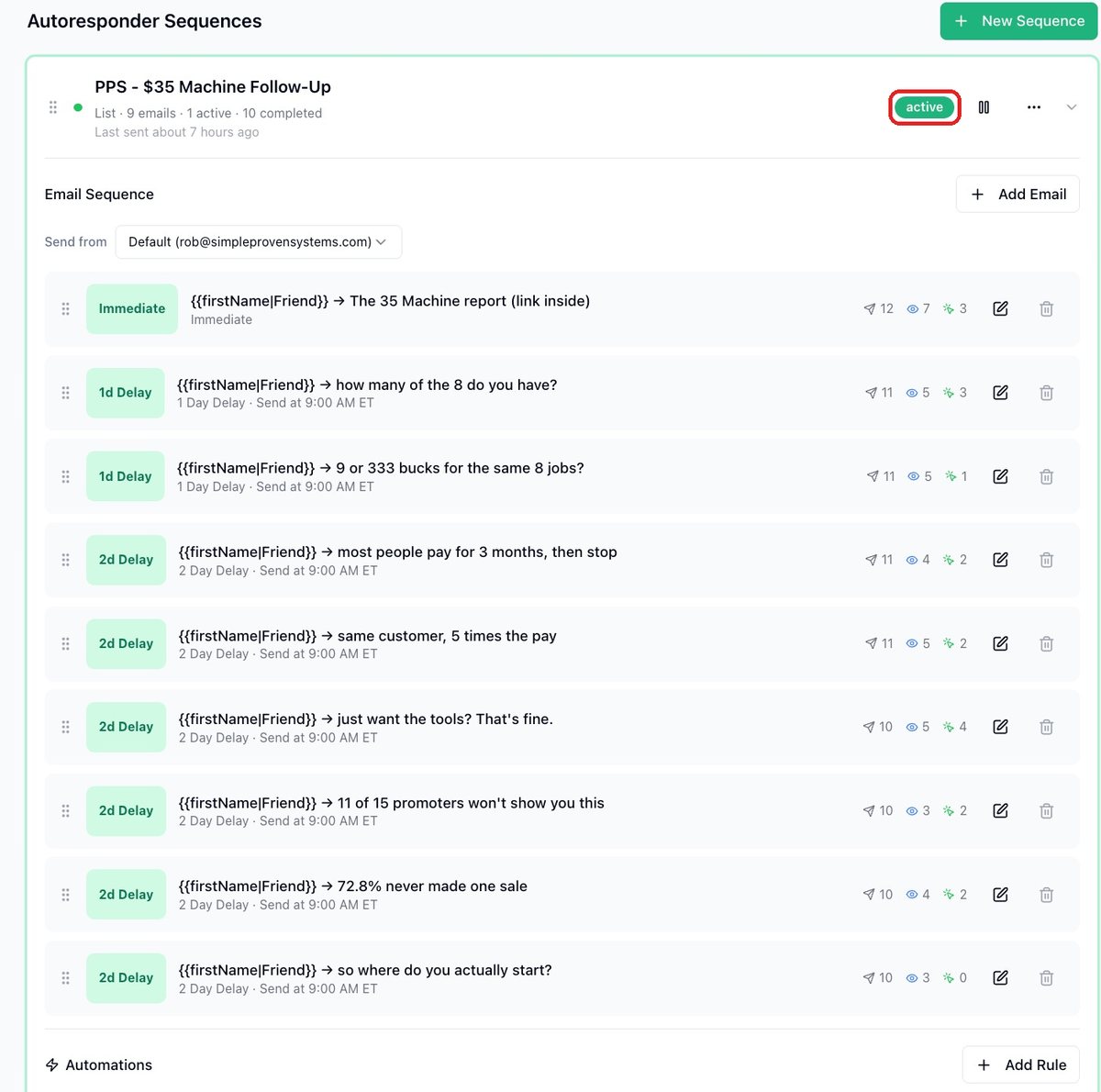
PPS - $35 Machine Follow-Up. Turn on Perfect Timing for emails 2 to 9. They'll go out at 9:00 AM Eastern, not at 3 AM. - Switch the sequence on.
Step 2: Sign up to your own funnel
- Open my opt-in page →Open this page from the link in your "Your pages are live" email, and this button appears here. It opens with your name on it.
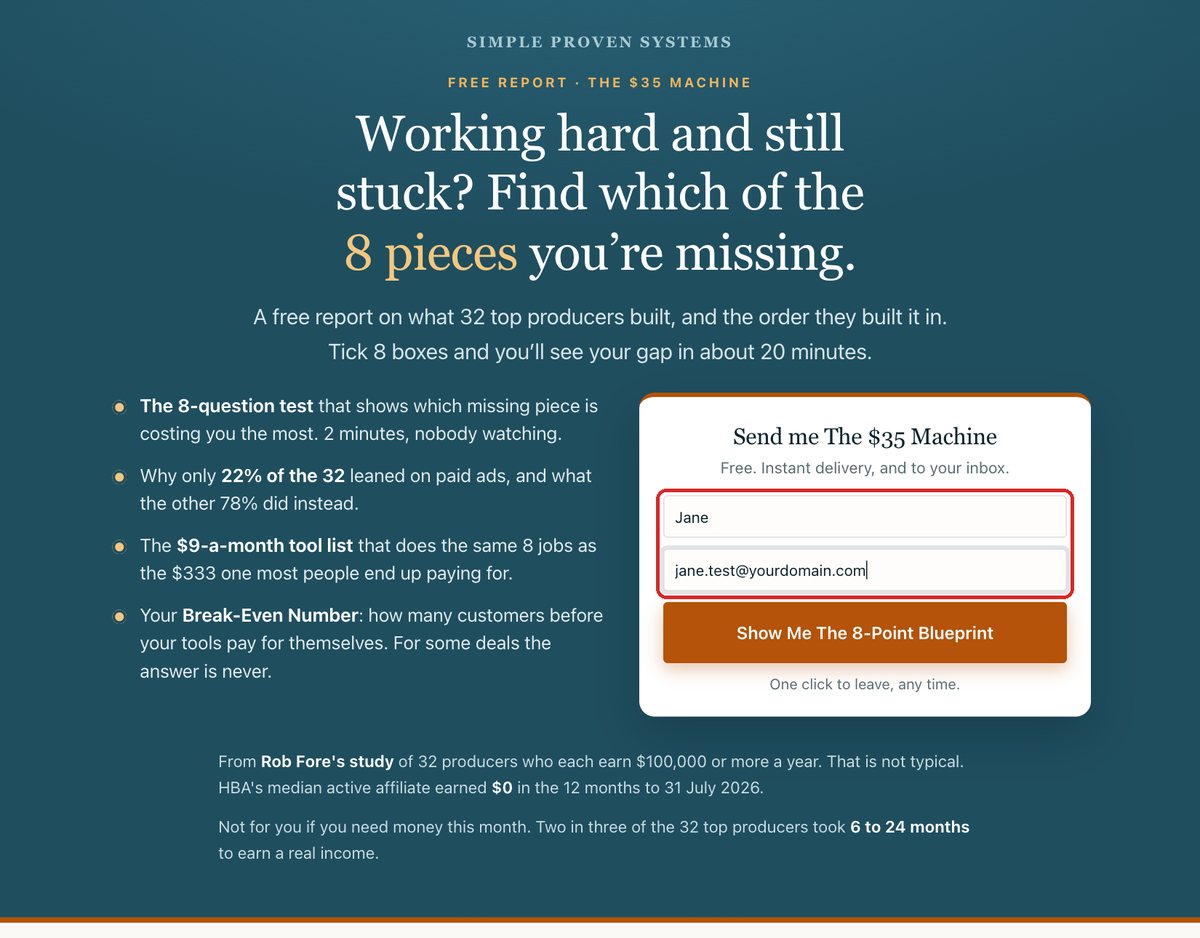
- Type your first name and any real email address you can open. Your everyday one is fine. Click Show Me The 8-Point Blueprint.
Step 3: Check four things
- You land on a confirmation page with your own name on it. (Someone else's name means Part 4's link is wrong. Paste it again.)
- Email 1 arrives within a few minutes. Not in your inbox? Check spam: mail from your own address back to you often lands there. Click its link. It opens your report with your name on it.
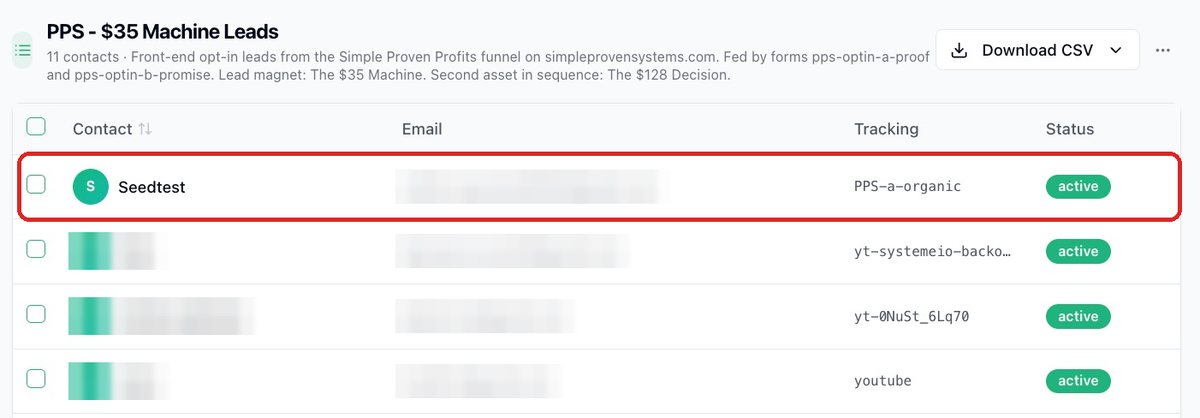
- In the Emailer, under Contacts/CRM then Lists, the address you used is on
PPS - $35 Machine Leads. (Not there? The form isn't joined to the list. Go back to Part 2, Step 2.) - Your setup pageYour setup page, Step 3, now shows ✓ Setup verified. Refresh it if needed.
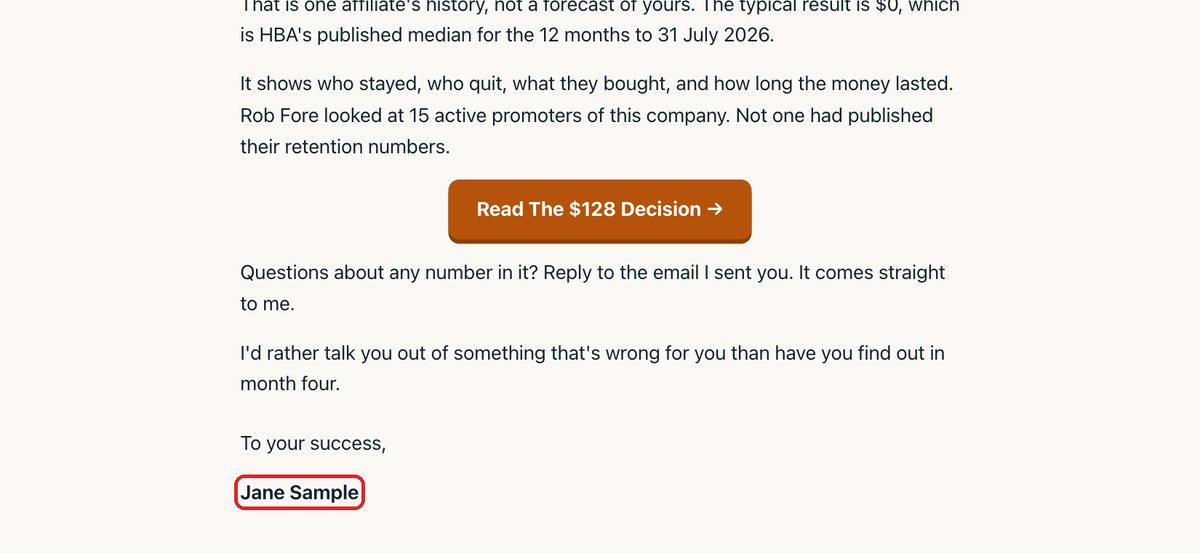
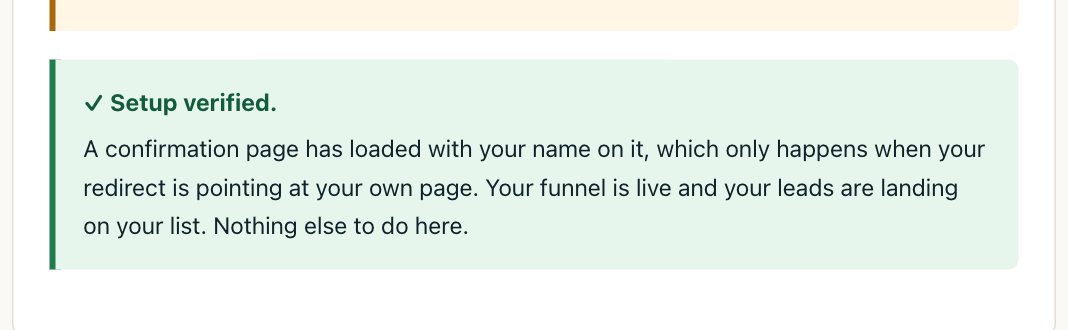
That's it! Your funnel is live. The moment it verified, your sponsor got an email saying you're set up and live. You don't need to tell them.
You're set up
That's the whole job. You don't need to do anything else today. Your next step arrives by email: week 2 of your plan, where you get your share links and pick one place to post.
Still stuck?
| What you see | Why | Fix |
|---|---|---|
| The opt-in page shows a button but nobody lands on the list | The form has no list | Part 2, Step 2. Choose PPS - $35 Machine Leads on the form. Save. Test again |
| The confirmation page shows someone else's name, or none | The redirect is missing or cut short | Part 4. Copy the whole link again and paste it over the old one |
| No email 1 after 10 minutes | The sequence is off, or on the wrong list | Part 5, Step 2. Check its list and that it's on. Look in spam |
| Email 4 arrived on day 6 | The delay was typed as days since sign-up | Set delays to 0, 1, 1, 2, 2, 2, 2, 2, 2 |
| A link says "not set up" | Setup isn't verified yet | Finish Part 6 |
| "This link needs to come from your sponsor" | The sponsor part of the link is missing | Ask the person who brought you in for their affiliate ID and type it in |
| Subject shows "there" for everyone | People skipped the name box, or the merge tag lost its name part | Normal for blank names. Check the subject reads {{firstName|there}} |
Still stuck after that? Reply to the email your links came in, and say which Part and Step, and what you see.